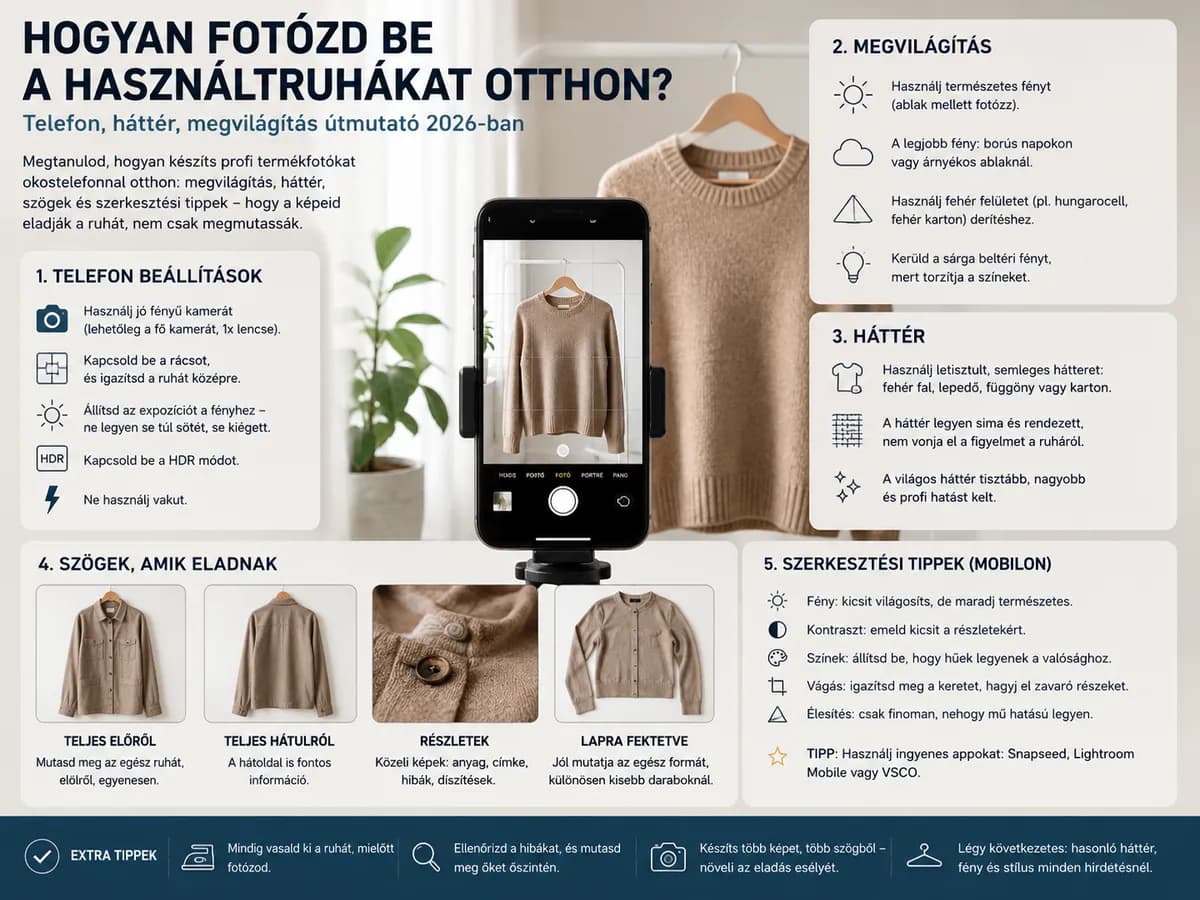
Think about it: when someone is browsing Vinted or Facebook for clothes, they see dozens of listings at once. Their eyes pause for a moment, and they decide. They don't read the description, they don't check the size, they don't click through to the seller. They only see what you showed them – those few photos.
That moment is where everything is decided. A well-lit, sharp photo taken against a clean background tells the buyer: "this seller takes their work seriously, I can trust them." A dark, blurry photo taken against a cluttered background says the same thing: "the clothes are probably no better than this photo."
Most beginner sellers think that photo quality depends on camera quality. That's a misconception. The secret to professional product photography is light and background – not the price of your equipment. A mid-range smartphone from today is more than enough to make your photos stand out on Vinted – if you know how to use it.
In this guide we'll walk through everything step by step: what lighting to use, what background to choose, what you absolutely must show, and a few editing tricks that elevate your photos without misleading the buyer. If you haven't yet read about which platforms are worth selling on, check out our platform comparison article – your photography strategy should be adapted to that as well.
Who is this guide for?
Beginner and intermediate second-hand resellers who sell on Vinted, Facebook, or their own webshop. No expensive equipment needed – just a few ground rules you learn once and then follow automatically. Once your photography is sorted, you'll negotiate less and receive fewer buyer complaints.
One of the most widespread misconceptions in second-hand clothing photography: "once I get a proper camera, I'll start taking professional photos." That day never comes, or when it does, it turns out the problem was never the camera.
The truth is that a smartphone made after 2020 – whether it's a budget Samsung, Xiaomi or iPhone – is perfectly sufficient for professional-level product photos, if you know how to use it. Lighting and composition matter far more than camera quality. An expensive DSLR still produces bad photos in poor lighting.
Important rule
Don't buy anything until you've tried what kind of results you get with your phone and window light combined. In most cases you'll find you don't need anything else. Buying equipment is the most expensive form of procrastination.
If you learn only one thing from this guide, make it lighting. A well-lit photo taken against a mediocre background will always beat a beautiful-background photo taken in poor light. Light determines everything: the true colour of the item, how visible the texture is, the overall feel and the professional appearance.
The best light source available to you is your window. Place a clothes hanger next to a large window, or lay a sheet in front of it for flat-lay shots, and you'll immediately get professional results. Natural light spreads evenly, has a cool white tone, and gives exactly the realistic effect buyers expect.
The ideal time to photograph is between 10:00 and 14:00 – the sun is high enough for light to come in from the side, but direct sunlight isn't falling on the clothes. Avoid direct sunlight: it casts harsh shadows and washes out details.
Pro tip
An overcast day is ideal for photography. Clouds act as a natural diffuser: they produce soft, even, directionless light with no shadows. If it's cloudy outside, start shooting immediately – this is the best "studio" you'll find.
- Yellow indoor lighting – Traditional bulbs or warm white LEDs give clothes a yellow tint that misleads buyers about the true colour and leads to complaints.
- Phone flash – The built-in flash "bleaches out" texture, casts harsh shadows and completely ruins the mood of the photo. Never use it.
- Night-time photography with indoor light – Without natural light, the result is almost always poor. Postpone your photography session until the next morning.
- Harsh one-sided shadows – If light only hits one side of the item, shadows hide the details. Rotate the garment or reposition it relative to the light source.
- Mixed light sources – If natural light and artificial light are hitting the item at the same time, the camera can't decide what white balance to apply. The result is a muddled yellow-blue mixed tone.
A ring light is a circular LED lamp that illuminates the subject evenly from all sides with minimal shadow. Available at low cost, it's a useful addition if you regularly photograph in the evening or if your home doesn't have a large window. However, it's important to know: a ring light is no miracle cure – the yellow tint problem remains if white balance is set incorrectly. If you get one, set it to white (cool white, not warm white) mode, and also switch your camera to daylight or bright white balance.
The background is the visual "frame" around the item. A good background doesn't draw attention – it stays invisible and lets the product take centre stage. A bad background alone can ruin an otherwise good photo.
If you photograph regularly, it's worth setting up a fixed "photo corner": a white-walled corner with natural light and a permanent hanger – so every session is fast and consistent. Consistency also builds trust: buyers know what to expect from your listings.
What to definitely avoid
A messy room as backdrop, laid out on patterned bedding, draped over a sofa cushion, hung in the back seat of a car – all of these reduce perceived value. The subconscious message to the buyer: "if the seller photographs in these conditions, what conditions are the clothes stored in?"
A good product photo isn't just attractive – it also informs. The buyer needs to see everything they would pick up and examine in a shop: the front, the back, the brand label, the fabric, and every flaw or sign of wear. If you skip this, you'll get complaints. If you show it, you gain trust – and fewer returns.
- Front view – The full garment is visible, on a hanger or laid flat. This is the first photo that appears in the listing.
- Back view – The same, from the back. Always required, because buyers want to see that too.
- Care/brand label – A close-up of the inner brand and composition label. This proves the brand and gives the fabric composition. Without it, no one will pay a premium price for a branded piece.
- Flaws and wear – If there's anything – pilling, a worn collar, a small stain, faded colour – it must be shown. This doesn't put buyers off: quite the opposite, it builds trust and protects you from buyer complaints.
- Collar / neckline – Especially for shirts and blazers, where condition shows most clearly here.
- Zip and buttons – Do they work? The buyer wants to know. A close-up is more convincing than any description.
- Fabric texture – Thick, thin, shiny, matte, woven or knitted? A close-up reveals a lot and reduces returns.
- Size label – If you photograph the size tag, you don't need to type it into the description, and the buyer sees it immediately.
- Side shots from both directions – The silhouette of the shoe is best seen from the side.
- Sole from below – Buyers judge the degree of wear from the sole. If the sole is heavily worn, show it – if it's nearly new, that's a selling point worth highlighting.
- Inner insole – The condition indicator from which many buyers gauge overall usage.
- Upper detail – Leather wear, stitching condition, buckle, lace area.
- Brand marking – The part inside the shoe showing the brand name. Authenticates the brand.
The golden rule
If a buyer complains because they didn't see a defect – that is your responsibility. If you show the defects and the buyer still purchases: no complaint, no return, a satisfied customer and a good review.
Photo editing isn't deception – used in the right measure, its purpose is to make the photo show exactly what you saw in reality when you held the item. A phone camera doesn't always reproduce the true colour and brightness perfectly – editing corrects that.
Permitted edits
Brightness and exposure correction: if the photo came out slightly darker than reality, raise the brightness. Goal: show what you actually saw. Slight contrast increase: highlights texture and makes the photo appear sharper. Slight sharpness increase: if the fabric details aren't crisp enough. White balance correction: if the camera captured the white as yellow or blue, correct it so the background appears truly white.
Prohibited – causes buyer complaints
Changing the colour: if the item is dark blue and you edit it to look blue-grey in the photo, the buyer won't receive what they ordered. This leads to complaints, returns and bad reviews. Strong Instagram filters: vintage, film or high-contrast filters change the true appearance. Artificially removing the background: if you cut out the item and place it on a white background badly, the edges will be ragged and the result looks unprofessional. Retouching away defects: if you retouch out a stain or worn area – this is deception and guarantees a return.
These are the mistakes that almost every new reseller makes in the beginning. Read through this list and avoid them, and you'll already be ahead of most other sellers.
- Dark, underexposed photo. The most common cause of bad photos is insufficient light. If the photo is dark, texture disappears, colour goes yellow, and buyers lose confidence in the item. Photograph by a window during the day.
- Cluttered, messy background. Wardrobes, shelves, furniture in the background – all distract from the product. Buyers don't want to look at things that aren't for sale.
- Only one photo, front view only. Without a back view, brand label, and a photo showing the item's condition, the buyer can't make a decision. A single front-view photo is the most costly mistake you can make in product photography.
- Not showing defects. Hiding pilling, a worn collar or a small stain can backfire: the buyer disputes the sale, sends it back and leaves a negative review. Transparency builds trust, it doesn't put people off.
- Blurry, shaky photo. Hand-held phone, poor light and an unsteady hand: the result is an out-of-focus shot. Place the phone on something, or use a mini tripod. If you hold it by hand, lean on a surface or a wall.
- Portrait mode for clothing photos. The phone applies artificial background blur, which looks unnatural and inaccurate on clothes. Turn off portrait/bokeh mode.
- Inconsistent style. If every listing looks different – different background, different angle, different light – your profile creates a fragmented impression. A unified look is more professional and more memorable.
Each platform handles photos slightly differently, and each has a different audience. What Vinted expects, Facebook doesn't need – and vice versa. If you know what to focus on per platform, you won't need to reshoot every photo, but it's worth adjusting the emphasis.
Good product photography isn't magic – it's a learnable, structured process that, once mastered, you apply automatically with every single item. The first few sessions will be slow and uncertain. By the fiftieth it's routine. After the five hundredth, buyers automatically trust you because every listing presents a consistent, transparent and compelling image.
The 5 golden rules of product photography:
- 1. Photograph in natural light, by a window – Light is the single most important element. Everything else is secondary. If the light isn't good, don't photograph.
- 2. Use a white, empty background – A white wall or sheet lets the item be the star. Any other background distracts.
- 3. Upload at least 4 photos per item – Front view, back view, brand label, defects. This is the baseline; anything less confidently reduces conversion.
- 4. Show the defects too – Transparency builds trust, prevents complaints and brings good reviews. Hiding defects is the most common cause of negative feedback.
- 5. Edit lightly and truthfully – Brightness and contrast are fair game, colour is not. The photo should reflect reality – neither better nor worse.
If you have the stock and you're now planning how to sell it, browse our current inventory – our constantly updated range has items in every category that you can photograph professionally using the tips above and sell with confidence. For pricing guidance, our margin guide is a useful starting point, where we walk through the numbers category by category.
If you have any questions about photography, stock or ordering, feel free to get in touch – we're happy to help you find the best solution for your needs.